Demystifying Bring Your Own Reputation (BYOR) technique for fun and profit
BYOR (Bring Your Own Reputation) is a reputation based technique exploiting bydesign flaws in the cyber defense.

Demystifying Bring Your Own Reputation (BYOR) technique for fun and profit
Preface

Crafting resilient defenses is essential in protecting against a growing number of malicious threats. Organizations across the globe invest significantly in defensive solutions, relying on their capabilities to detect and block adversaries. Adversaries and defenders are engaged in an ongoing cat-and-mouse game, and as defenders devise new protection strategies, attackers innovate novel ways to circumvent these defenses. At P.I.V.O.T Security, we believe that understanding the intricacies of these bypass techniques is essential for maintaining a robust defense.
Straight from P.I.V.O.T's R&D red team labs:
We've conceptualized a technique we call Bring Your Own Reputation (BYOR). A demonstration is up on our LinkedIn post.
TL;DR
- BYOR abuses Microsoft SmartScreen's reputation-based trust by piggy-backing on legitimately-reputed scripts (.bat, .cmd, .vbs) that contain insecure code paths.
- Sideloading an unsigned EXE through one of these aged, well-known files defeats the Mark-of-the-Web (MOTW) and SmartScreen prompts without an EV certificate.
- Defenders cannot rely on file reputation alone; behavioral telemetry around child processes spawned from script files is the durable signal.
POC in Action
POC with BYOR Bypass: This technique ensured there were no SmartScreen prompts and Windows Defender remained silent during exploitation.
To begin, we set up a Havoc Command & Control server on a VPS, which let us access it remotely using a Team server to reach the GUI. Once Havoc was set up, we created a custom payload that would give us a callback inside Havoc, which paves the way for the BYOR technique.
Background
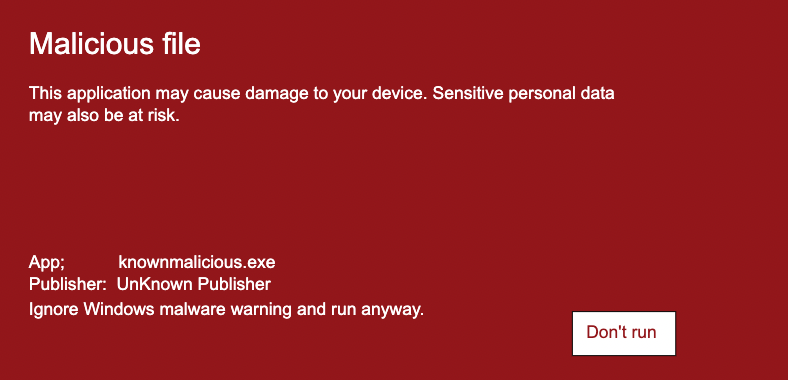
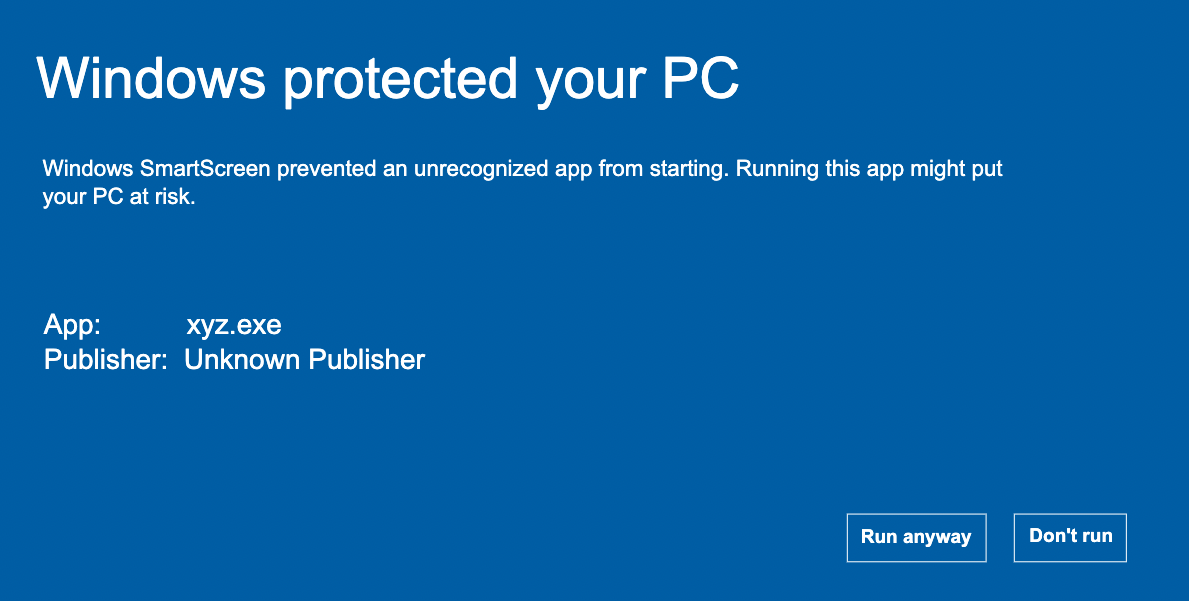
A foundational understanding of any system is the key to navigating its complexities, and Microsoft's SmartScreen is no exception. Let's take a closer look at how SmartScreen operates. According to Microsoft, Microsoft Defender SmartScreen identifies potentially malicious downloaded apps or installers in two primary ways:
-
It inspects downloaded files and compares them against an extensive list of reported malicious software sites and programs. If there's a match, a warning pops up that signals the user about the potential harm.
-
In parallel, it evaluates these files against a list of popular and frequently downloaded items. If a particular file hasn't made its mark on this list, SmartScreen raises an alert and asks the user to proceed with care.
Windows, like many operating systems, has multiple lines of defense to protect its users. One notable feature is SmartScreen, which uses cloud-based anti-phishing and anti-malware components to check web pages and files against a list of reported malicious sites and files. To enhance this security feature, any file downloaded from the internet is tagged with the Mark of the Web (MOTW), acting as a footprint of the file's origin.
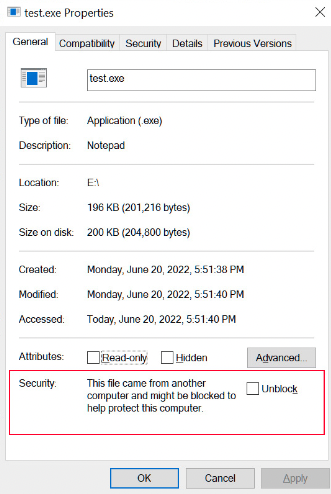
This system is mostly reputation-based, which means well-known files with a positive track record are less likely to be flagged or restricted. The potential loophole arises in how this reputation is determined or manipulated.
To shed some light on the current exploitation techniques used by threat actors, let's look at them first.
Common Vectors Used by Threat Actors
To fully appreciate the potential of the BYOR technique, it helps to understand the current strategies threat actors employ to bypass systems like SmartScreen:
-
Signed Executables: Files like EXE, MSI, MSIX, APPX, or even ClickOnce applications are often signed to help bypass security measures. However, many of these methods require an extra EV certificate to bypass SmartScreen, making it a restrictive path for many threat actors.
-
Containerizing the Initial Infection: Some adversaries use containers such as zip, iso, vhdx, vhd, or 7z to wrap the payload, intending to bypass browser protection. This method still faces challenges with MOTW and SmartScreen.
-
ISO with Sideloading: ISO sideloading can effectively bypass SmartScreen checks and execute payloads. Yet this method's popularity means it's more likely to be detected by EDR systems.
- Inspecting the PlugX Technique: While testing ISO and sideloading, issues have arisen, especially with the planned Windows security update that intends to block the loading of unsigned DLLs within signed EXEs. With sideloading, if you run an executable Microsoft has approved, you can load an unsigned DLL alongside it. Whether this trick holds up in the long haul is an open question.
This brings us to the core question:
Can BYOR truly overcome these challenges?
Navigating the Gray Areas
Here is where things get interesting. What if, hypothetically, one could manipulate or make use of files already on Microsoft's "good list"? Could we then trick SmartScreen and bypass the security checklist?
A prevalent myth says that for an .exe, .dll, or even an .msi to gain Microsoft's stamp of approval, it needs to bear an EV signature. Our hands-on research paints a different picture. We've encountered numerous executable files (.exe, .msi and others) that successfully evaded SmartScreen's checks despite lacking a valid digital signature.
When software accumulates a substantial number of downloads, it steadily establishes a positive SmartScreen reputation, and this very reputation mechanism is what we explore further with the BYOR technique. SmartScreen reputation also figures heavily in our EDR Part 2 series where we layer ClickOnce on top of evasive loaders.
BYOR (Bring Your Own Reputation)
Bring Your Own Reputation (BYOR) is an old and lesser-known bypass technique conceptualized to exploit the inherent reputation-based system of defenses such as Microsoft's SmartScreen. The core philosophy behind BYOR comes from understanding that many modern protective measures, notably SmartScreen, lean on the reputation of files to determine their safety.
Fundamental Principles of BYOR
-
Exploitation of Reputation Mechanism: At its heart, BYOR is about understanding and manipulating the reputation mechanism.
-
Beyond Signatures: Unlike some bypass methods that require files to have a digital signature, BYOR operates beyond this. In the BYOR approach, files that lack a valid digital signature but have an established reputation can still bypass checks.
Microsoft's SmartScreen is designed to swiftly verify whether a downloaded executable or a browsed site is recognized as safe or harmful. Our main aim is centered on optimizing initial access delivery.
When SmartScreen scans a file before saving it to disk, it checks whether the downloaded file is recognized as safe. If it's identified as a widely downloaded and safe file, it allows the download. However, if the file is unfamiliar or has been flagged as malicious, the user sees a stringent SmartScreen warning.
With bypass techniques like CVE-2022-44698 emerging, threat actors consistently devise new methods. The term "Bring Your Own Reputation" (BYOR) defines a category of files (both signed and unsigned) that are whitelisted by SmartScreen and can be manipulated to evade security measures.
BYOR encompasses various file types including .bat, .jscript, .vbscript, .msi, and .exe, which can be leveraged to bypass checks.
How BYOR Bypasses the Need for Signatures
While digital signatures are a standard method for establishing trust, they are not the only one. Reputation-based systems, by their nature, lean on the historical behavior of files. If a file has been widely circulated and used and hasn't been flagged as malicious over time, it can gain a positive reputation. For complementary AV-side evasion that rides on similar by-design flaws, see our writeup on the Zombie Bypass technique.
The Basic Structure of BYOR
- Selecting the File: Identify a file that's been around for a significant period. My top choice is a .bat file due to its readable and open nature, which lets us directly view and understand the code within. In this section I'll walk through exploiting a .bat file that's been around for over a decade.
- Exploiting the Code: Probe the insecure code segments within the selected file to perform unintended actions.
- Abusing for Malicious Intent: Abuse that file to initiate something malicious. Since SmartScreen does not cascade checks to all sideloaded files, our payload neither requires signing nor a position on SmartScreen's approved list.
Applying BYOR in Operations
Wondering how to implement BYOR to your advantage? If we mirror the strategies used in DLL sideloading, we can curate a similar sequence via BYOR which opens the door for unsigned sideloading as well. Here is the process we showcased in our LinkedIn post, shown as a flowchart for clarity:
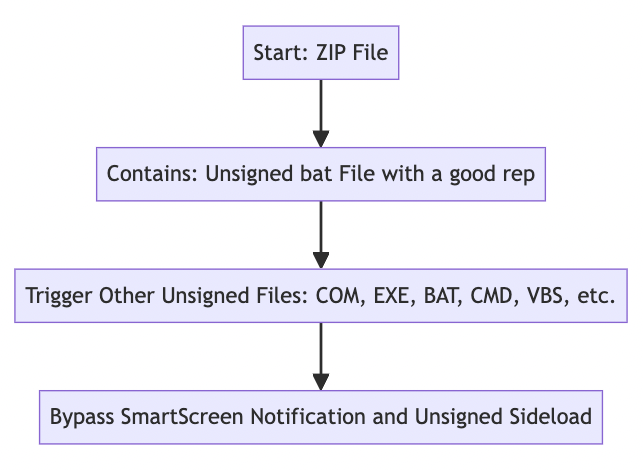
Leveraging the BYOR Approach for Initial Access Chain Creation
Let's look at how this method can be used to create an initial access chain with a simple yet effective example.
-
Find a reputed file that is badly coded.
- Cyber attackers commonly look for reputed files with poor coding practices. This works because such files have established trust but are vulnerable due to their coding flaws.
-
Locate a source to download such files.
- Websites like exefiles.com are often used by cyber professionals. They offer files that have existed for a long time, some of which may have known vulnerabilities.
-
Choose the right file.
- For example purposes, we'll use a .cmd file: [ps2pdf14.cmd / ps2pdf13.cmd / ps2pdf12.cmd]. This file can be found at Ps2pdf.cmd (exefiles.com). Note there is no Chrome warning when downloading it, so we are already on the right path.
-
Exploitation strategy.
- Dive deep into the existing functionality and code of the file.
- Always look for loopholes. This might include a file calling another batch file, or a file calling another using functions like
call. - The objective is to pinpoint a piece of code that calls another file or executable. This allows us to manipulate execution.
-
Diving into the chosen file.
- Our chosen file contains this specific line of code: call 'ps2pdf' '-dCompatibilityLevel=1.3' params. Here, the file calls
ps2pdfsituated in the same directory. However, no file extension is specified in this function.
- This is interesting to say the least. When you run Process Monitor on Windows, you'd notice it tries to find all possible file extensions located in the PATHEXT environment variable. The
callfunction initiates a search of all extensions in PATHEXT. Something similar to the image below: it is looking forps2pdf.jsbut checking all types of file extensions beforehand.
- This essentially means the code will attempt to execute any file with a matching name, regardless of its extension, in the current directory.
- Our chosen file contains this specific line of code: call 'ps2pdf' '-dCompatibilityLevel=1.3' params. Here, the file calls
-
Taking advantage of the flaw.
- This is where we put on our hacker hat. Given the file's code flaw, it's ripe for a BYOR attack.
- Here's a simple strategy: create another file named ps2pdf.exe which triggers a Havoc C2 remote callback when executed on the system. We'll also rename the downloaded ps2pdf14.cmd to something else, say payload.bat.
- What happens next is fascinating. By manipulating the code, we can sideload a .exe file. This means, regardless of SmartScreen filters or other security protocols, we can run a js, vbs, jse, wsf, vbe, exe, bat, com, or even a py file (provided Python is installed).
-
Crafting the initial access chain and testing it.
- Though the original ps2pdf14.cmd / payload.bat has a reputation, the file it calls might not. The workaround is to pack both files inside a container that can be delivered directly inside a browser.
- For this example, we containerized the payloads, which creates a .zip out of the package.
- As demonstrated in the POC, sideloading another unsigned EXE file bypasses any SmartScreen prompt.

- Note: There's no prompt when downloading the byor.zip file.
For delivery purposes, we created a .zip file using our in-house (in-research) OCA (Offensive Chains by Astra) framework. With OCA we can automatically create a BYOR payload with just a few clicks, saving a huge amount of time and making red teamers more efficient when testing organization infrastructure with new kill chains. A standout feature is the ability to auto-deploy the crafted payload to a designated VPS for hosting, as demonstrated in this post. Within the zip, which is stored securely on the VPS, there are two crucial files: a BYOR-driven batch file capable of evading both MOTW and SmartScreen, along with an unsigned sideloaded executable. The initial version v0.1 will soon be available, providing red teamers with a powerful tool to assess their organization's defenses.
We plan to release a more comprehensive version focusing on evasive loaders in an upcoming post.
Sideloading Techniques: Advancing the BYOR Tradecraft
Advancing the BYOR Tradecraft
BYOR offers unique advantages in sideloading. Some innovative techniques to enhance outcomes include:
- Using vhdx, iso, or img file extensions with BYOR for even better outcomes. These file types can further obfuscate the payload, making it harder for security tools to detect.
- There is potential for direct downloads via Google Chrome (and similar browsers) even without containerization to remove MOTW for payloads. Though this needs its own discussion, it broadens the attack vector beyond what we've shown in our R&D. (We will likely talk about this in another blog.)
Here's a small gist: a strategic approach where a user clicks a link which subsequently drops two files:
- Installer.bat, which serves as the BYOR payload that bypasses SmartScreen and Windows Defender in place.
- A VBS file tasked with calling the Havoc command and control (C2).
Merging Techniques Using the OCA Framework
The OCA (Offensive Chains by Astra) framework offers a methodology to bypass browser security policies and advanced endpoint defenses. By integrating the above sideloading technique with the OCA framework, we can pwn most EDR-backed hosts. In our tests, we enhanced the sideloading approach using the OCA framework by combining it with various other methods (BYOR gadgeting), resulting in a more powerful attack simulation strategy.
At its core, BYOR Gadgeting refers to the strategic use of trusted and legitimate code or functionality ("gadgets") within reputable software. Inside an organization, red teamers can harness these gadgets to simulate potential attack vectors, highlighting that even trustworthy software can be manipulated. This method can be stealthier and harder to detect because security systems are often designed to block known malicious code or suspicious behaviors, but they may not be as effective at spotting the misuse of legitimate functionality.
Our in-house OST, "Offensive Chains by Astra", demonstration can be seen below using the BYOR technique: If you are interested in watching the PoC for the BYOR generated payload, you can skip to the end of the article.
We currently support only Windows. We plan to release support for other operating systems like Linux and macOS in the near future.
Elevating Red Team Assessments with the OCA Framework
The primary aim is to mimic a real-world attack and emulate the tools, techniques, and procedures (TTPs) of actual threat actors to expose weaknesses. With our OCA (Offensive Chains by Astra), we are not just meeting the industry standards but taking a leap forward.
The Traditional Approach: Assessing with Known Kill Chains
Conventionally, when assessing an organization's security posture, it's common to simulate known attacks or kill chains. The idea is simple: by understanding how defenses hold up against recognized threats, organizations can design strategies to stop them. This simulation results in creating a 'playbook' which serves as a defense manual against such known cyber attacks.
The OCA Framework: Going Beyond the Known
For truly robust security, we must go beyond what's already known. This is where the OCA Framework stands out. While it's beneficial to have a playbook against recognized attacks, it's equally important to acknowledge that, in real-world targeted attacks, these playbooks may not work as expected.
It is crucial to test infrastructure defenses against the latest cyber-offense techniques that are not yet in the limelight. These lesser-known vectors, which may not be widely abused yet, have the potential to be the next large-scale breach.
Our OST deeply integrates this principle. We prioritize researching such understudied vectors, understanding their potential risks, and incorporating them into our simulation techniques.
Further Thoughts on BYOR and Evolving Cybersecurity Threats
BYOR, as a concept, carries vast implications for cybersecurity. It indicates that even software considered safe might have its own flaws. As the digital landscape grows, the list of trusted software also expands, which gives attackers more opportunities to exploit. Defenders should evaluate their infrastructure against the most recent attack techniques, including those that are not widely recognized or exploited.
- Detection Challenges: Defending against such evolving threats is not easy. Traditional methods that rely merely on file checks can struggle to counter such sophisticated attacks. What's required is a more holistic approach to detection that doesn't solely rely on historical reputation.
- OST and Organizational Defense: We have recognized these challenges and built an Offensive Security Tool (OST) called OCA (Offensive Chains by Astra) specifically tailored to exploit these gray areas. Its intent is not malicious. By enabling red teamers to simulate these advanced threats, we help blue teams gain the knowledge needed to strengthen their defenses in place.
Defender Takeaways
- Treat SmartScreen reputation as one signal, not the truth. A new-domain download paired with a reputed but interpretable file (.bat, .cmd, .vbs) is the BYOR shape, alert on it.
- Hunt for
cmd.exeor script hosts spawning unsigned executables from%TEMP%,%LOCALAPPDATA%, or browser download folders, especially when both files share a directory. - Audit Authenticode telemetry for unsigned PEs that get launched inside the same session as a freshly extracted archive (zip, iso, vhdx, img, 7z).
- Block or warn on archive container types that strip MOTW (iso, img, vhd, vhdx) at the email or proxy layer where business needs allow.
- Detect
callorstartpatterns in batch scripts that resolve viaPATHEXT, this is the exact gadget BYOR abuses.
MITRE ATT&CK Mapping
| Technique | Name | Where it appears in this post |
|---|---|---|
| T1553.005 | Subvert Trust Controls: Mark-of-the-Web Bypass | Containerized delivery and BYOR's core SmartScreen / MOTW evasion |
| T1036 | Masquerading | Reusing a long-reputed .cmd / .bat to disguise the staging gadget |
| T1027 | Obfuscated Files or Information | Use of vhdx, iso, img containers to obfuscate the payload |
| T1218 | System Binary Proxy Execution | Sideloading an unsigned EXE through a trusted, reputed script |
Our Commitment to the Community
The trajectory of cybersecurity is determined by the community. Depending on the direction the community wishes to pursue regarding BYOR and similar tactics, we are determined to share further insights, detection mechanisms, and offensive techniques.
The insights here are just the tip of the iceberg. At P.I.V.O.T Security we have a wide range of strategies and we're excited to share them in future articles.
The best way to predict the threat landscape is to create it.
Proof of Concept (POC) for the above infection chain using OCA framework + BYOR technique
BYOR technique POC shared in LinkedIn post using other extensions.
Want this kind of analysis on your stack?
A 30-minute briefing with one of our practice leads. No sales pitch.